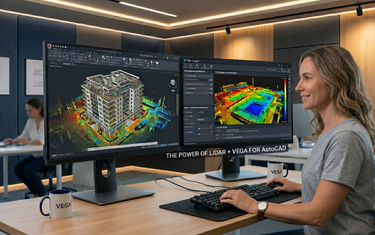

You've attached the point cloud. The scanned data is there: complete, accurate, full of information. And then you stare at a dense, three-dimensional mass of millions of points stacked on top of each other, and wonder where to even begin. If you've worked with complex building structures in AutoCAD, you know exactly that moment. The data is perfect. The visibility isn't.
Dynamic slicing is the feature that solves this. And once you've used it on a real building project, it's genuinely difficult to imagine working without it.
What Is Dynamic Slicing and Why Does It Matter?
At its core, dynamic slicing is the ability to cut an interactive cross-section plane through a point cloud and move it in real time, isolating only the data at a specific elevation, depth, or orientation that you want to work with at any given moment.
Think of it as the difference between trying to read a book through a full bookshelf versus pulling out one volume at a time. The information was always there. Dynamic slicing is what lets you access exactly the right layer of it, instantly, without disturbing everything else.
For architectural work specifically (floor plans, facade elevations, section drawings, structural analysis), this is transformative. A multi-storey building scan contains data from every floor, every wall face, every roof element, every interior partition, all simultaneously. Without the ability to isolate layers within that data cleanly and quickly, drawing accurately from it becomes an exercise in visual interpretation rather than precise extraction.
How VEGA's Dynamic Slicing Works Inside AutoCAD
VEGA's dynamic slicing tool runs directly inside AutoCAD, which means there's no platform switch, no file export, and no rebuilding of work in a second environment. You're working in the drawing, with the point cloud attached, and the dynamic slice operates as an interactive control within that same session.
The slice is defined by a cutting plane: horizontal, vertical, or at any user-defined angle and thickness. That thickness is the key variable. A thick slice captures a wide band of points, giving context and spatial awareness. A thin slice, sometimes called a "salami slice," isolates a very narrow band of data for precise, clean linework extraction.
Both have their place in architectural workflows, and moving between them is immediate. There's no waiting, no recalculating, no re-rendering. The slice updates in real time as you adjust it, giving you live visual feedback across the entire point cloud as you move through the building.
Floor Plans: From a 3D Cloud to a Precise 2D Layout
One of the most common architectural deliverables and one of the most time-consuming to produce from point cloud data without the right tools, is the floor plan. A building scan captures every floor simultaneously. Without dynamic slicing, extracting a clean, specific floor level means manually clipping and toggling display settings repeatedly, often with visual bleed-in from adjacent floors creating ambiguity in wall positions and room boundaries.
With VEGA's dynamic slicing, the workflow becomes direct and controlled:
- Set the slice height - position the cutting plane at the standard survey height for the floor you're working on, typically 1.0-1.2 meters above finished floor level, to capture wall positions, door openings, and partition geometry clearly.
- Adjust slice thickness – a thin horizontal slice at this height isolates the wall cross-sections cleanly, removing ceiling data, floor data, and the floors above and below from the view entirely.
- Draw directly from the slice - wall lines, room boundaries, door and window openings are all visible in clear cross-section. You trace or extract geometry directly from what the point cloud shows, not from what you estimate is there.
- Move to the next floor - shift the slice plane vertically to the next level and repeat. Each floor is drafted from the same dataset, with the same consistency, in the same drawing session.
Practical time saving is significant. What previously required multiple manual clipping operations and constant visual disambiguation can be completed floor by floor in a single, focused workflow, with greater accuracy at each step because you're working from isolated, clean data rather than a visually complex full cloud.
Facade Analysis: Isolating Vertical Planes with Precision
Floor plans use horizontal slices. Facade work uses vertical ones and this is where dynamic slicing's flexibility becomes particularly powerful for architectural analysis.
A building facade scan contains the front face of the building, but also depth information: window reveals, balcony projections, pilaster depths, setbacks between different facade planes. If you're working with the full 3D cloud trying to draw an elevation, all of that depth data is visually present simultaneously, making it hard to distinguish the primary facade plane from recessed or projecting elements.
A vertical dynamic slice set to a shallow thickness isolates a specific depth band of the façade: the primary wall face, the window reveal plane, the cornice line - and lets you work within that plane with clarity. You're no longer interpreting a 3D volume. You're drawing from a precise 2D cross-section through the exact part of the building you need.
For restoration and renovation projects in particular, this depth control is not just convenient - it's necessary. Facade documentation for planning applications, conservation reports, or like-for-like replacement specifications requires each facade element to be drawn at its correct geometric depth. Dynamic slicing makes that level of distinction achievable and repeatable, on any facade plane, at any orientation.
Multi-Storey Buildings: Managing Complexity Without Losing Control
The real test of any point cloud workflow tool is a genuinely complex building: one with irregular floor heights, mezzanine levels, split-section structures, or historical additions that don't align to a standard grid. These are the projects where manual point cloud management breaks down fastest, and where the quality gap between working with and without dedicated tools is most visible.
VEGA's dynamic slicing handles multi-storey complexity in a way that stays manageable because the control is always in the user's hands. There's no automated pre-processing that locks the data into predefined levels. You define where the slice is, how thick it is, and how it moves, which means irregular floor heights, sloped soffits, mezzanine levels, and non-standard structural elements are all approachable using the same tool, adjusted to the specific geometry of the building you're documenting.
For a building with five floors, that means five clean horizontal working environments generated from a single scan file, each accessed by moving the slice plane vertically. For a building with an irregular courtyard facade at a non-orthogonal angle, it means rotating the slice plane to align with that facade's geometry and working in the same way. The tool adapts to the building. The building doesn't need to adapt to the tool.
Surrounding Sections: Going Beyond Flat Slices
Dynamic slicing in a flat plane is the foundation. But architectural structures (particularly historic ones) contain elements that can't be fully documented from a single orthographic slice. Cornices, archways, complex molding profiles, column capitals, staircase balusters: these are three-dimensional forms that require section cuts taken around their perimeter to document accurately.
VEGA's surrounding sections tool extends the slicing concept into three dimensions. Rather than cutting a flat plane through the point cloud, it generates cross-sectional profiles around an inner axis - letting you document the full profile of a complex architectural element by reading the section at multiple orientations simultaneously.
For restoration architects working on historic buildings, this capability closes a documentation gap that flat slicing alone cannot fill. A cornice profile, a column entablature, a decorative window surround - all of these can be fully profiled from the point cloud without manual measurement or site revisits.
From Slice to Deliverable: The Complete Architectural Workflow
Dynamic slicing doesn't exist in isolation. It's the entry point to a series of connected workflows that take a raw building scan all the way through to professional architectural deliverables - all within AutoCAD, all in a single session.
The typical path from scan to deliverable looks like this:
| Stage | VEGA Tool | Output |
|---|---|---|
| Isolate working level | Dynamic slice - horizontal | Clean floor cross-section |
| Draw floor plan | Slice + drawing tools | Accurate 2D floor plan with areas |
| Document facade | Dynamic slice - vertical | Orthographic facade elevation |
| Profile complex details | Surrounding sections | Molding profiles, cornice depths |
| Draw wall thicknesses | Double line tool | Parallel wall geometry from cloud |
| Produce section drawings | Linear section tool | Building cross-sections and profiles |
Each stage feeds naturally into the next. The slice isolates. The drawing tools extract. The output is a standard DWG file ready for planning submission, Revit preparation, conservation report, or client delivery - without ever leaving AutoCAD.
Why Architectural Professionals Specifically Benefit
Architects and architectural surveyors face a particular challenge with point cloud data that differs from general survey work: they need to read intent as well as geometry. A surveyor documenting terrain needs accurate surface data. An architect documenting a building needs to understand how that building was designed, how it has changed over time, and how its elements relate spatially to each other across multiple levels and facades.
Dynamic slicing supports that interpretive, analytical way of working. Because it lets you move through the building layer by layer, at any orientation, in real time, it supports the kind of spatial exploration that architectural understanding requires. You're not just extracting geometry — you're reading the building. And the more complex and historically layered the building is, the more that real-time, interactive exploration matters.
For renovation projects especially, where the existing building fabric is the primary design constraint, a tool that lets you navigate a complete building scan with this level of control and immediacy is not a convenience. It's a fundamental part of producing work that accurately reflects what's actually there.
From Analysis to Action
Dynamic slicing is the kind of feature that sounds straightforward in a description but reveals its full value the moment you use it on a real project. The combination of real-time interactivity, precise thickness control, multi-orientation flexibility, and seamless integration with the rest of VEGA's drawing tools makes it the central capability around which complex building workflows in AutoCAD are built.
If you work with building scans (whether for new documentation, renovation planning, or restoration work), the most direct way to understand what dynamic slicing changes is to try it on your own data. VEGA's full feature highlight videos are the fastest way to see each tool in context before you begin, and a free trial gives you complete access to explore the workflow on a live project.