
Most surveyors don't have a data problem. They have a time problem. The scan comes back from the field dense, accurate, and full of information - and then the real bottleneck begins: hours, sometimes days, of manual processing, tracing, and modeling inside AutoCAD before a single deliverable is ready to send.
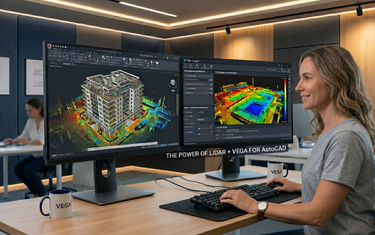
If that sounds familiar, you're not alone. Processing point cloud data manually in AutoCAD is one of the most time-consuming parts of modern survey work, and it's also where the most errors creep in. VEGA was built specifically to solve this problem. It's a point cloud editor that works directly inside AutoCAD, automating the heavy lifting and giving surveyors a set of purpose-built tools that dramatically compress project timelines without sacrificing accuracy.
Here are five ways VEGA does exactly that.
Dynamic Slicing: See What You Need, Instantly
One of the most fundamental challenges when working with a dense point cloud is simply seeing the right data at the right time. A full 3D scan of a building, road corridor, or terrain site contains millions of points stacked across multiple elevations, and trying to draw from that visual noise is exhausting and imprecise.
VEGA's dynamic slicing feature cuts through that problem immediately. It lets you move an interactive cross-section plane through the point cloud in real time, isolating only the data at the elevation or depth you're actively working on.
In practice, this changes everything about how you draft. Instead of toggling display settings or manually clipping regions, you slide the section plane to the floor level you want and draw directly from the clean, isolated slice in front of you. Floor plans that would previously require multiple manual steps now come together in a single, focused workflow. Wall positions, room boundaries, structural elements - all visible clearly, at the correct elevation, without distraction.
For surveyors working on multi-storey buildings or complex terrain profiles, dynamic slicing alone can cut drafting time significantly. It's not just a display tool. It's a workflow tool.
Automated Ground Detection: Stop Cleaning Data by Hand
Ask any surveyor what takes the most time after a terrain scan, and the answer is almost always the same: cleaning the point cloud. Trees, vehicles, street furniture, people who walked through the scan - all of it ends up in the data, sitting on top of the ground surface you need to model.
Manually identifying and removing these non-ground objects point by point, or region by region, is tedious and slow. It's also one of the most error-prone parts of the entire process, because it's repetitive work done by tired eyes.
VEGA automates this. Its ground detection and object removal tools identify non-ground elements (trees, cars, poles, and other above-ground objects) and remove them from the point cloud automatically, leaving a clean ground surface ready for terrain modeling. The same automated filtering applies when creating a DTM (Digital Terrain Model) surface, where VEGA can generate the surface directly from the point cloud while filtering out foreign objects in the same step.
The result is a process that used to take hours of manual cleanup now handled in minutes, and with greater consistency than manual editing can reliably deliver.
Automatic TIN Generation and Contour Line Creation
Once the ground surface is clean, the next step in almost every terrain survey is building a TIN: a Triangulated Irregular Network, and generating contour lines from it. In a standard AutoCAD workflow, this involves multiple manual steps, third-party tools, and often a fair amount of back-and-forth adjustment.
VEGA compresses this entire process into a single, automated sequence. Its automatic TIN triangulation tool builds the irregular network directly from the point cloud data, connecting ground points into a continuous mesh surface that accurately represents the terrain. From that TIN, contour lines are generated automatically at whatever interval the project requires.
This isn't just faster, it's fundamentally more accurate. Because the TIN is derived directly from measured point cloud data rather than from manually traced geometry, the resulting surface reflects the actual terrain rather than an approximation of it. For projects where earthwork volume calculations or drainage analysis depend on surface accuracy, that distinction matters enormously.
VEGA also supports the creation of Civil 3D surfaces directly from the point cloud, making it straightforward to pass terrain data into Civil 3D workflows for projects that require it.
Road Mapping and Infrastructure Digitization in a Single Pass
Road surveys and corridor mapping projects present a particular challenge in traditional workflows. You need to identify and draw centerlines, lane markings, curbstones, drainage channels, and sometimes wired infrastructure - all from a single scan dataset. Doing this manually means switching tools repeatedly, making isolated decisions about each feature type, and spending significant time aligning everything correctly.
VEGA addresses this with a set of dedicated digitization and road mapping tools that let surveyors extract multiple infrastructure features from the point cloud in a streamlined, connected workflow. The double line tool (used for curbstones, facade fronts, and road edges) captures parallel geometry accurately and at speed, pulling directly from the point cloud rather than requiring manual offset calculations.
Wired infrastructure (power cables, telephone lines, drainage networks) can be mapped and drawn directly from the scanned data as well. And for pipe and cylinder detection, VEGA's cylindrical section tool locates the center point and diameter of a pipe from the point cloud with minimal points required - a task that is notoriously difficult to do accurately by hand.
The practical impact is significant. Road mapping projects that previously required multiple processing stages and repeated site revisits can be completed in a single office workflow, working from scan data captured in one field session.
Linear Sections, Profiles, and Facade Drawings - Without Leaving AutoCAD
The final category where VEGA compresses timelines is in the production of sections, profiles, and elevation drawings: deliverables that clients expect but that are traditionally time-intensive to produce.
Creating a linear section or profile from a point cloud in standard AutoCAD requires careful manual slicing, projection, and tracing. VEGA's linear section tools automate this process, letting you define a section line and generate an accurate profile directly from the point cloud data along that path. For road projects, this means longitudinal and cross-sectional profiles are produced in a fraction of the time.
Facade and elevation drawings follow the same logic. VEGA's extended elevation tool projects the relevant point cloud data onto a flat plane and lets you trace or extract the facade geometry from that projection with precision. For architectural documentation, heritage recording, or as-built surveys of building exteriors, this removes one of the most labor-intensive steps in the entire deliverable workflow.
Taken together, these tools mean that a single surveyor working inside AutoCAD with VEGA can produce a broader range of deliverables: sections, profiles, facades, floor plans, terrain models - from the same scan dataset, without switching platforms, exporting data, or rebuilding geometry from scratch.
The Bigger Picture: From Weeks to Hours
VEGA's core promise is straightforward: significant shortening of point cloud processing in AutoCAD, from weeks and days to hours and minutes - using tools that don't exist anywhere else in the market.
That's not a marketing claim. It's a description of what happens when manual, repetitive processes are replaced by purpose-built automation. The five workflows covered in this article - dynamic slicing, automated ground detection, TIN generation, road mapping, and section/profile production - each address a specific bottleneck that surveyors face daily. Together, they represent a fundamentally different way of working with point cloud data inside AutoCAD.
The accuracy doesn't change. The scanned data doesn't change. What changes is how long it takes to turn that data into a professional deliverable and how much cognitive load the process places on the person doing it.
The best next step is a simple one: try it on a real project. VEGA offers a 30-day free trial that gives you full access to every tool described in this article, with no commitment required. One project is usually enough to see exactly where the time savings land.
FAQ: VEGA and Point Cloud Surveying in AutoCAD