
Most professionals don’t switch the tools they trust. They extend them. After years of building expertise in AutoCAD: learning its shortcuts, its logic, its behavior under pressure - the last thing any serious CAD professional wants is to abandon that investment and start over in an unfamiliar interface to process a point cloud. That’s not a rhetorical setup. It’s the design philosophy behind VEGA.
AutoCAD Is Already the Foundation
The engineering, surveying, and architecture industries are built on AutoCAD. The DWG file format is the de facto standard for project delivery across the AEC world, and nine out of ten AEC professionals globally work with it. That adoption runs deep: every workaround, every custom block library, every keyboard shortcut represents real investment: in time, in training, in accumulated knowledge that took years to build.
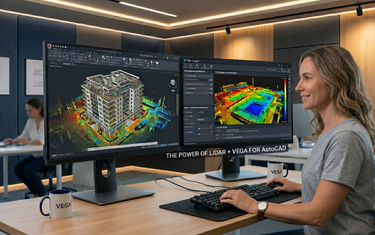
The significance of VEGA running inside AutoCAD (not alongside it, not replacing it) cannot be overstated. When you launch VEGA, you are still in AutoCAD. The ribbon, the command line, the coordinate system, the layers, the blocks, the snap modes: all exactly where you expect them to be.
What "Native Integration" Actually Means in Practice
“Integrates with AutoCAD” is used loosely in the software industry. Sometimes it means data can be exported between two separate applications. With VEGA, it means something more specific: VEGA runs as a plugin directly within AutoCAD’s own interface, operating on the same drawing file, in the same session, with no data transfer between platforms.
The result is a set of capabilities that behave like natural extensions of AutoCAD, not like functionality bolted on from outside. Here’s what that means for a typical workflow:
| Workflow Step | Without VEGA | With VEGA in AutoCAD |
|---|---|---|
| Isolating a working level in the cloud | Manual clipping + display adjustment | Dynamic slice: interactive, real-time |
| Drawing wall lines from scan data | Visual estimation, manual offset | Double line tool: derived from cloud |
| Generating terrain surface | Export to third-party tool, reimport | TIN generated directly in AutoCAD |
| Producing elevation profiles | Manual section cutting + tracing | Automated linear section + profile view |
| Measuring pipe diameter | Manual calculation from sparse points | Cylindrical section tool: auto-detects |
| Removing ground noise / vegetation | Manual point selection and deletion | Automated ground detection and filtering |
Every task stays in a single AutoCAD session. No roundtrips to external software. No format conversion. No version mismatch between the point cloud reference and the drawing file.
No Learning Curve
Adopting a new software platform carries a hidden cost that rarely appears in the sales pitch: time spent learning the interface, loss of productivity during the adjustment period, and resistance from team members who don’t want to upend an established workflow. For a busy surveying firm or engineering office, that hidden cost is often the deciding factor, and it’s why genuinely useful tools get left on the shelf.
VEGA sidesteps this problem almost entirely. A surveyor who knows AutoCAD will understand VEGA’s workflow within hours, not weeks. The commands follow AutoCAD’s logical structure, and the interface respects conventions that AutoCAD users already know. VEGA was developed by professionals who live inside the AutoCAD ecosystem every day, which means it was built with direct knowledge of how CAD professionals actually work: the projects they handle, the deliverables they produce, and the workflows they’ve already optimized.
One Platform, Many Disciplines
A surveyor working on a terrain project, an engineer documenting infrastructure, and an architect producing a facade survey are all doing fundamentally different work. But all three are working in AutoCAD, and all three encounter point cloud data as part of their workflow. The ability to apply point cloud tools from within AutoCAD across all these contexts, without switching platforms or holding separate licenses for specialist applications, is a genuine operational advantage.
| Professional Role | Primary Use Case in AutoCAD + VEGA |
|---|---|
| Land surveyor | DTM, TIN, contour lines, volume calculations |
| Civil / infrastructure engineer | Road mapping, corridor profiles, utility documentation |
| Architect | Floor plans, facade elevations, as-built documentation |
| Restoration specialist | Heritage facade surveys, window/door dimensioning |
| Drone data operator | Processing aerial scan data into survey deliverables |
| Construction project manager | As-built vs. design deviation checks |
The File Is Always Yours
When VEGA tools generate geometry: contour lines, facade drawings, road centerlines, terrain surfaces, cross-sections, that geometry lands directly in your AutoCAD drawing as standard AutoCAD entities. Lines, polylines, hatches, blocks: native objects that any AutoCAD user can open, edit, and share without VEGA installed. No proprietary format. No locked deliverable. No dependency on a third-party subscription just to open the file you already produced.
For professionals who collaborate across firms, submit drawings to municipal authorities, or deliver to clients with their own CAD environments, this is not a minor point. A DWG produced through a VEGA workflow is indistinguishable from any other AutoCAD drawing, it fits into any existing delivery process without friction.
When the Tool Fits the Profession
The AutoCAD-VEGA combination works because VEGA was built with a clear understanding of where AutoCAD stops and where professional point cloud work begins. AutoCAD provides the coordinate system, the drawing environment, the file standard, and the interface that professionals already trust. VEGA provides the specialized intelligence: ground detection, dynamic slicing, automated surface generation, facade projection, that AutoCAD was never designed to include natively.
Neither component tries to be the other. AutoCAD doesn’t pretend to be a point cloud processor. VEGA doesn’t pretend to be a general-purpose CAD application. Together, they cover the full workflow from scan attachment to professional deliverable, each doing exactly what it does best, in the same session, in the same file. For CAD professionals who work in AutoCAD every day, it’s the right combination.
If you’re already working in AutoCAD and your projects involve point cloud data, the most practical next step is to see the combination in action on your own data. A free trial is available at vega-app.com, and demo videos covering the full feature set are a good place to start if you want to understand the scope of what’s possible before you install anything.